Free printable color reference
Caliart Brush / Chisel 121 swatch chart
Download a blank A4 swatch chart with 121 distinct printed labels for Caliart Brush / Chisel 121. Fill the rounded boxes with your own ink and keep it beside your collection.
2 A4 pages · 108 boxes per full page · Black-and-white · Free
Download free PDF ↓Customize names, paper, codes or box size →Does this chart match my set?
121 distinct labels from the linked product-specific list. Check the series and tip edition against your packaging.
This is a chart for the named set/edition. Compare its labels with your markers before printing.
Source type: Retailer / product chart.
View the source chart or exact product evidence ↗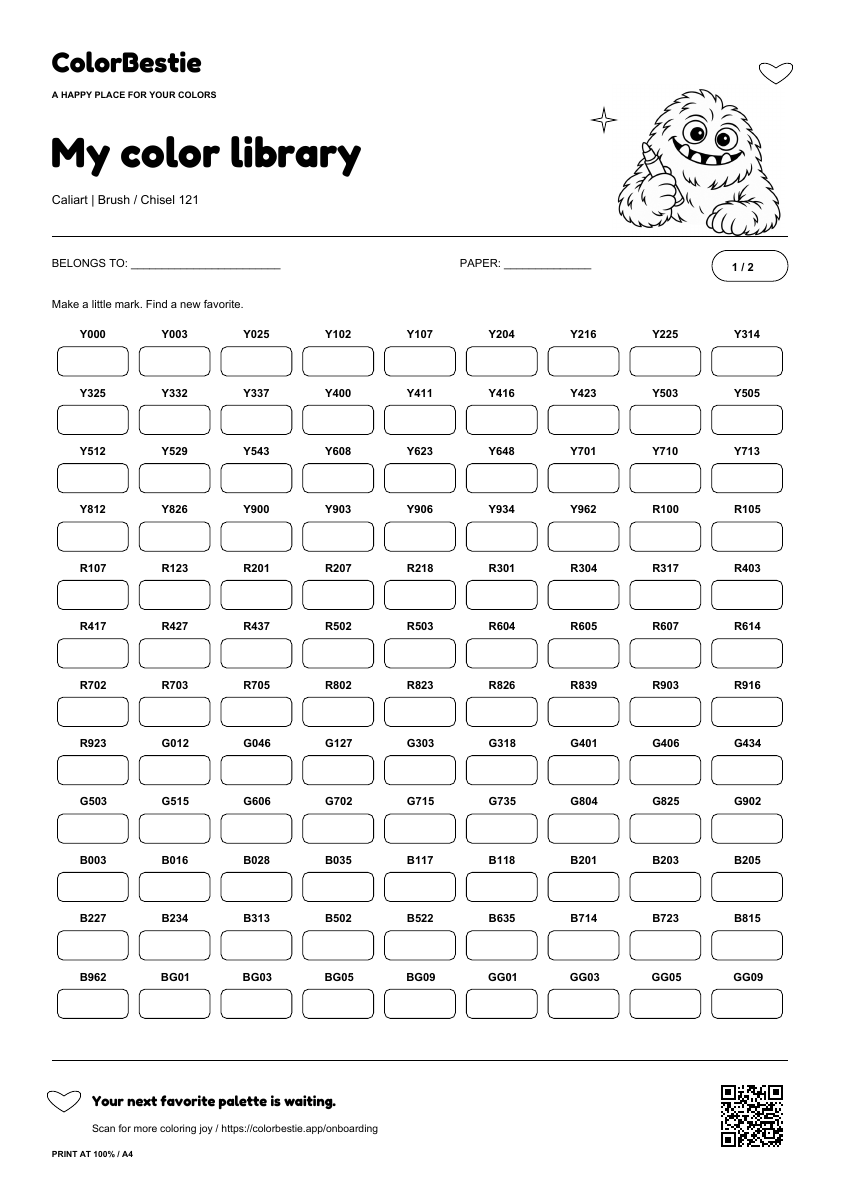
How do I use a marker swatch chart?
Read the printable color chart guide for help choosing and using your sheet. This is a ColorBestie blank template, not a manufacturer-issued filled color chart.
- Print the PDF at actual size / 100% on your usual coloring paper.
- Write your name and paper details on the sheet.
- Use the matching marker in each empty box. Let the ink dry before comparing shades.
For alcohol markers, place a spare sheet underneath to catch bleed-through. Screen colors, paper coating, layering and drying can change how a shade looks; your own ink swatch is the useful reference.
Which labels are included?
These are the actual labels included in the download. Repeated labels appear once; a blender can have its own box. The total is a label count, not a promise that every pen is a different ink color.
Open a section to find codes starting with that letter or number.
01 label
- 0
B23 labels
- B003
- B016
- B028
- B035
- B117
- B118
- B201
- B203
- B205
- B227
- B234
- B313
- B502
- B522
- B635
- B714
- B723
- B815
- B962
- BG01
- BG03
- BG05
- BG09
C5 labels
- CGII00
- CGII02
- CGII04
- CGII07
- CGII09
G21 labels
- G012
- G046
- G127
- G303
- G318
- G401
- G406
- G434
- G503
- G515
- G606
- G702
- G715
- G735
- G804
- G825
- G902
- GG01
- GG03
- GG05
- GG09
N2 labels
- NG03
- NG07
R30 labels
- R100
- R105
- R107
- R123
- R201
- R207
- R218
- R301
- R304
- R317
- R403
- R417
- R427
- R437
- R502
- R503
- R604
- R605
- R607
- R614
- R702
- R703
- R705
- R802
- R823
- R826
- R839
- R903
- R916
- R923
S1 label
- S
W4 labels
- WG00
- WG03
- WG05
- WG09
Y34 labels
- Y000
- Y003
- Y025
- Y102
- Y107
- Y204
- Y216
- Y225
- Y314
- Y325
- Y332
- Y337
- Y400
- Y411
- Y416
- Y423
- Y503
- Y505
- Y512
- Y529
- Y543
- Y608
- Y623
- Y648
- Y701
- Y710
- Y713
- Y812
- Y826
- Y900
- Y903
- Y906
- Y934
- Y962
Choose colors after swatching
Use the palette generator to plan a small color group or the marker converter to find digital alternatives in supported sets. Select your actual collection and check the results against this chart; not every printable code list has digital color data.
For a shading study, use the alcohol-marker blending helper and test the suggested overlaps on this same paper.