Keep your subject colors fixed and compare three backgrounds: untouched white paper, one pale color, and one darker color. Make the comparison in small sketches before filling the open space on your final coloring page. Choose the option that keeps the part you care about easy to see and asks for an amount of filling you want to do.
This is a background decision for a subject you have already planned or colored. You do not need a new palette for every object, a complicated gradient, or a new set of supplies.
Keep the subject unchanged for the comparison
Write down the subject’s main colors, including any small pale detail you want to preserve. Then keep those colors, the subject’s size and its outline the same in all three trials. If you change the cup, its background and its decorations at once, it becomes harder to tell which change you actually prefer.
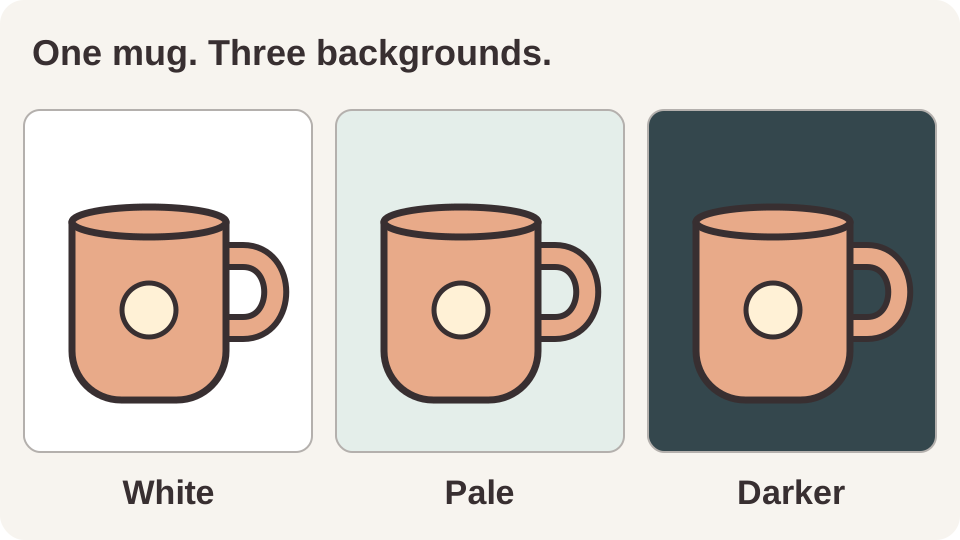
Here is our original digital example: the same peach mug with a cream circular badge, drawn three times. Only the rectangle surrounding it changes.
Compare white, pale and darker
White: leave the paper as part of the design
Start by looking at the white version before adding anything. Do you like the outline and the open space around the subject? If so, keep it. A background can be an intentional uncolored area; this exercise does not require filling every part of the page.
In the example, white leaves the mug’s dark outline clearly visible without adding another colored field. If your page already has many objects, this is the first option to compare rather than a fallback after buying another medium.
Pale: add a surrounding color
Try one pale color you already own. Here the pale green-gray introduces a colored field while keeping the surrounding area light. Look specifically at the subject’s palest edge: can you still see the detail you want, and do you like the relationship?
If a pale subject and pale background become too similar for your taste, change the background candidate. You can also keep some surrounding paper white. There is no requirement to repair the already colored subject.
Darker: check the whole edge before committing
Compare a darker candidate, such as a darker blue-gray, brown or green from your supplies. In our drawing, the peach mug and cream badge sit against a much darker field. Check dark features too: a dark handle, black line or deep-colored petal can become less distinct beside another dark area.
You may like the look but decide against filling that much space. Write that down as part of your choice. A small trial only helps you choose a direction; it does not establish that a large marker background will fill evenly.
Look at lightness as well as the color name
Getty’s art vocabulary describes value as how light or dark a color is, alongside hue and intensity. A different color family alone does not tell you how light or dark the background will look beside the subject.
Adobe’s contrast guide explains that contrast can come from hue, saturation and brightness, and that neighboring colors can affect their apparent appearance. That is why we compare each background directly around the same subject instead of choosing from isolated caps or swatches. For a broader explanation, see our guide to color contrast.
Make three small trials with your own supplies
With alcohol markers, put clean protection directly behind the working sheet; if its reverse has artwork or text you value, test on matching spare paper first or choose a practice page, because backing does not protect the reverse of that same sheet. See our bleed-through guide and Copic’s guidance on backing and paper.
- Draw three simple outlines. Use a spare piece of the same paper as your final page when available. A rough cup, leaf or circle stands in for the main subject; you do not need to reproduce a book illustration.
- Repeat the subject colors. Keep the same fill and small detail in every outline. Label the actual pencil or marker codes you use.
- Leave the first surrounding area white. Fill a similar amount of space around the second outline with your pale candidate and around the third with your darker candidate.
- Compare the finished trials. Let marker ink dry before judging it. Look at the subject edge, the pale details and the dark details in each version.
- Choose one direction. Mark white, pale or darker on the worksheet below. Record the actual code and medium if you plan a colored background.
This is a reader-run comparison, not a physical test report. If you do not have matching paper, your trial can help with the color relationship but cannot confirm how the ink will behave in the book. Keep the white option available while you decide.
For labeled blank boxes, use our free blank swatch chart. Make a small subject mark inside each box and put the candidate around it; an isolated background swatch misses the relationship you are choosing.
Your background decision worksheet
Write the fixed subject colors first. Fill the three rows after making your own trials; there is no pre-scored winner.
Subject and fixed colors: ______ Paper and medium: ______
| Background | Subject edge and details | Do I want this much fill? |
|---|---|---|
| White paper | ______ | ______ |
| Pale candidate: ______ | ______ | ______ |
| Darker candidate: ______ | ______ | ______ |
Chosen option: ______ Reason: ______ Areas staying white: ______
A useful decision can be as simple as “keep white; I like the small dark details clearly separated,” or “use the pale green around the flower; keep the outer border white.” Those are example notes, not universal color rules.
Use a digital idea as a shortlist
If you need candidates from a supported alcohol-marker set, use the free Palette Generator. Choose your exact collection and restrict it to owned codes where needed. It suggests colors; it does not evaluate the edges of your page or guarantee that a suggested role will suit your subject. You can choose a background from your own swatches without using it.
For an optional whole-page AI reference, see color ideas for your own coloring page. Generated details and colors may differ from the original and your real ink. Image generation uses your available preview allowance or credits, under the current credit rules; the three-trial exercise above does not need a generated image.
Sources and scope
Older community discussions about background ideas and favorite background media and techniques show readers asking what to put around a finished subject. They are question evidence, rather than material-performance tests. The illustration, trial sequence and blank worksheet here are original ColorBestie work. Getty and Adobe support the color terminology; the linked ColorBestie pages document the tools’ capabilities and limits.